|
|
|
Playlist Generator
One of the unique features of Nodeply is the
ability to generate a playlist, thus avoiding the repeated insertion
of media and the manual sorting of the loop.
You simply add media or campaigns to the
playlist and then adjust everything parametrically.
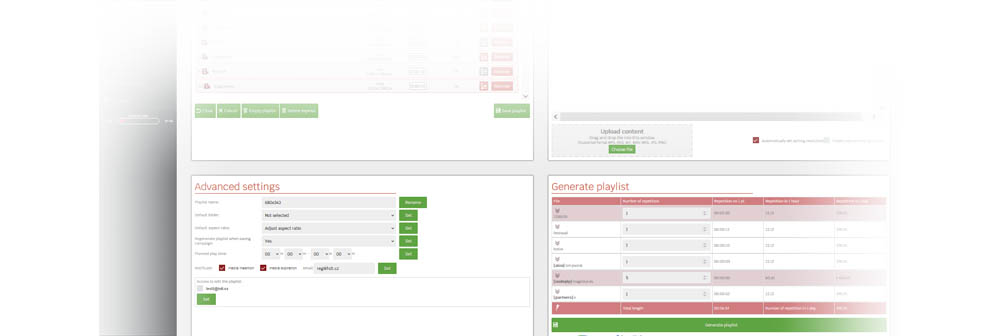
The playlist generation function applies
all the rules for you and creates an optimal distribution of
media in the playlist.
|
|
|
Basic Parameters:
- Inclusion/removal from the playlist at a specific
date and time
- Playback restriction to specific days
of the week
- Playback restriction to specific
times of the day
|
|

|
|
|
Additionally, you will find management
helpers in the generator.
|
|
|
|
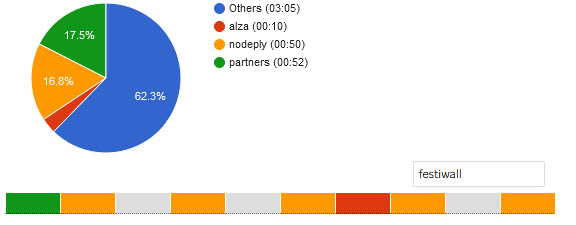
For example, Tag
Prefix. You can add a common text to a group of media,
and the system will display a layout and a pie chart showing how
much time (percentage) the group occupies in the playlist
|
|
|
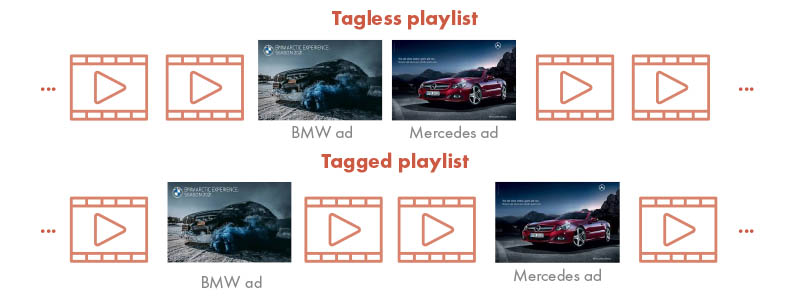
Another helper is
Media Group. This function is useful in situations
where you have advertisements in the playlist that should not be
played back-to-back (e.g., two different ads from the same brand or
ads for competing products). You assign them the same keyword, and
during playlist generation, these marked ads will be spaced as far
apart as possible.
|
|
|
|
|
And of course, the
generator includes the ability to specify the number of repetitions
of media in a single playlist playback.
You set the number of repetitions,
and the system will take care of the optimal distribution of
the playlist to ensure that your ads are evenly distributed and all
the set parameters are applied.
|
|